Showing posts with label schema mstr. Show all posts

Monday, May 20, 2013

Modifying column names


Sometimes in your projects you might need to accomodate a change in table column names. The process earlier was to manually unlink the dependent attributes, and then update the table structure using the WH catalog. Thanks to Architect tool, the process is much simpler now. I have three tables and in one of the table, the ID form for Attribute A1 is pointing to column A11. This column is changed to columan name A1.
The below is the screen shot of the changes that needs to be done using Architect.

Open the Architect from Schema menu, and go to table view.
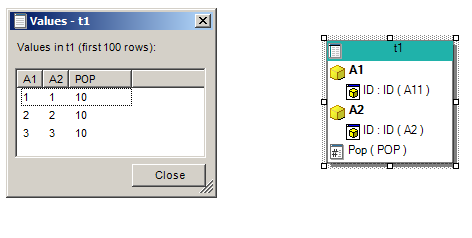
Right click on the table and show data. You will see that the column name has changed.


Right click on the table and update structure. You will see the new table as below. A1 is the new column name.

Now you need to modify the definition of A1 attribute to include this change.


In my project attribute A1 has multiple ID forms. This is why you are seeing two definitions. . I want to remove A11 since column name A11 does not exist anymore and i dont reference it in any other tables.


You cannot just choose the defnition for A1 column without deleting / removing A11 definition.


Once you are done, go to hierarchy view. You will see that the relationship is broken


Click on A2 and frag a line pointint to A1. The Architect will create the relationship between these two attributes.
Save and update scema and you are done :)

Wednesday, May 1, 2013

Logical Key - Part 1


Logical Key


Remember seeing a symbol like this ? Where did you see this ? I was conducting few interviews and I was surprised to see that many candidates did not know about it.

What is a logical key?

A logical key represents any column in a table for which you have defined an attribute and in case if there are multiple attributes from the same hierarchy, the key is shown only for the lowest level attribute.


Here I have two attributes; however Director is a child attribute of VP. Hence only the Director is having the logical key symbol.  Once i remove the relationship, both the attributes gets a logical key symbol.


 What is the signifiance of the logical key ?

MSTR join tables based on the attributes that have a key.  Lets look at this example. I have two tables, a Dimension table and tact table. I have two attributes - C1 and C2 and a fact - sales. The table i used in this example is shown below

C1_ID C1_DESC C2_ID C2_DESC
1 1A 1 2C
1 1A 2 2D
2 1B 3 2W
2 1B 4 2E
3 1C 5 2Q

C1_ID C2_ID SALES

1 1 10
1 2 15
2 3 20
2 4 25
3 5 10
I created two attributes C1 and C2 from the first table as lookup. I did not create a relationship between these two attributes.  The logical table looks like below.    


Here both the attributes have a key symbol. Lets create a report with C1, C2 and sales metric. The SQL for this report is shown below. 

select a11.[C1_ID] AS C1_ID,

         a12.[C1_DESC] AS C1_DESC,
         a11.[C2_ID] AS C2_ID,
         a12.[C2_DESC] AS C2_DESC,
         a11.[SALES] AS WJXBFS1
from ([FACT_TABLE_JOIN2] a11
        inner join [TABLE_JOIN1] a12
        on (a11.[C1_ID] = a12.[C1_ID] and
        a11.[C2_ID] = a12.[C2_ID]))

Why both C1 and C2 are appearing in the join clause ? This is because MSTR joins table based on the attributes that has a key. You can also say that MSTR joins tables based on the lowest possible child attribute. This lowest possible child attribute always have a key symbol.   Now, I defined C2 as a child of C1. Look at the change in key symbol and the SQL that is generated.  

Only C2 is having this key symbol. This is because C2 is the child of C2.  The new SQL is shown below. Now the join happens only using the attribute C2.   select a11.[C1_ID] AS C1_ID,
          a12.[C1_DESC] AS C1_DESC,
          a11.[C2_ID] AS C2_ID,
          a12.[C2_DESC] AS C2_DESC,
          a11.[SALES] AS WJXBFS1
from ([FACT_TABLE_JOIN2] a11
          inner join [TABLE_JOIN1] a12
          on (a11.[C2_ID] = a12.[C2_ID]))